

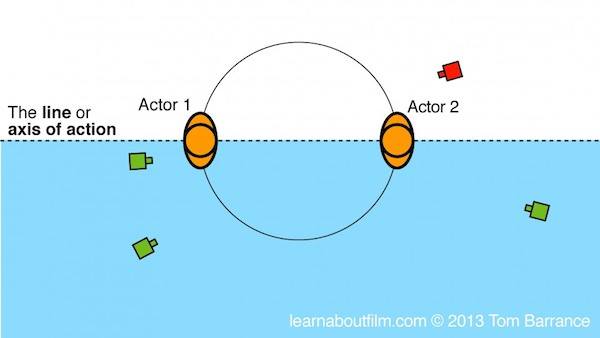
What is “Crossing The Line”?
https://www.youtube.com/watch?v=7tC1OTycqCQ
Actor 1 on the Left, Actor 2 on the Right
“Crossing The Line” is about screen direction, and consistency. Draw an imaginary line between your two characters (see right), Actor 1 and Actor 2. On one side of this line we place the camera. In this example, the camera is on the left hand side, pointing at the two characters. We will see Actor 1 on screen left, and Actor 2 on screen right. As long as we keep the camera on the same side of the line, Actor 1 will always be on the left, Actor 2 will always be on the right.
Don’t Cross The Line
Moving the camera over the line of action is called “jumping the line” or “crossing the line”.
Crossing the Line Confuses the Viewer
The problem with crossing the line is that it disorientates the viewer, and confuses them. Since your goal as a VFX film-maker (and also as a director and cinematographer) is not to confuse your audience, you want to avoid crossing the line. The simplest way to do this is always to keep the characters on one side of the screen or the other – don’t let them switch places.
Maintaining Screen Direction
Crossing the line is almost (but not exactly) the same thing as maintaining screen direction, which is a very similar and related concept; the two are usually considered together. If you maintain screen direction (eg, Orange on the right, Blue on the left) correctly, then you should also avoid crossing the line as well.

180 Degree Rule Explained
Below is a nice, clear video explaining these principles:
Crossing The Line in “Gladiator”
To see how Ridley Scott crosses the line in the classic film “Gladiator” (but does it with style and skill), watch the short clip below.
The Escape Studios VFX Blog offers a personal view on the art of visual effects. To apply for one of our courses, follow this link.
 THE ART OF VISUAL EFFECTS AT ESCAPE STUDIOS